To make a coloring book with AI for Amazon KDP, fix your trim size and page count first, prompt for pure black line art with no shading, clean every page to two colors at 300 DPI, assemble a single-sided interior of at least 24 pages, and declare the images as AI-generated when you upload [1][3].
Generating the pictures is the easy part. This guide covers what happens after: the 7 defects AI line art almost always ships with, the fix for each one, and the export settings that decide whether KDP accepts the file.
TL;DR:
- Decide trim size before you generate. A page made for the wrong aspect ratio gets cropped or padded later, and both show.
- AI images arrive with grey shading, open shapes, stray specks, and often a frame border nobody asked for. Each needs a fix before it goes in a book.
- KDP asks for images of "at least 300 DPI" and a minimum of 24 pages [1]. A 1024 px wide image stretched across an 8.5 inch page is about 120 DPI.
- KDP counts "cover and interior images and artwork" made by an AI tool as AI-generated content, and you declare it at upload [3].
Table of contents
- What do you need to decide before generating any pages?
- How do you prompt AI for clean coloring book line art?
- What goes wrong with AI coloring pages, and how do you fix it?
- How do you turn AI images into a KDP-ready interior?
- Do you have to tell Amazon the pages were made with AI?
- How do you check the book before you upload?
- Which AI workflow should you use?
What do you need to decide before generating any pages?
Three things: the theme, the trim size, and the design count. Trim size comes first because it sets the aspect ratio of every image you generate. 8.5 x 11 inches is a portrait page and 8.5 x 8.5 inches is square, and a picture generated for one does not fit the other without cropping or white padding.
The design count matters because single-sided coloring books use 2 interior pages per design: the drawing and a blank back so markers don't bleed through. 40 designs makes 80 pages before front matter, comfortably above KDP's 24-page minimum [1]. The page count planner does that arithmetic with front matter included.
Pick the theme narrowly. "Cozy cats" gives you a book. "Animals" gives you 40 unrelated pictures, and AI makes that problem worse because every prompt is a fresh roll of the dice.
How do you prompt AI for clean coloring book line art?
A coloring page prompt needs five parts: a specific subject with one focal point, a named line style, a line weight, an explicit ban on shading and fills, and the aspect ratio of your trim size. Leave out the shading ban and most image models add grey tones, because shading is what they think a finished drawing looks like.
A working prompt reads like a print spec, not a description of a mood:
A cat curled up asleep on an armchair beside a potted plant and a night window,
coloring book page, bold clean black outlines, uniform thick line weight,
pure white background, no shading, no grey, no fills, no text, no border,
portrait 8.5:11
"Beautiful" and "high quality" add nothing. "Sketch" and "drawing of" pull the model toward pencil texture, which is the opposite of what you want. The best AI prompts for KDP coloring books has tool-by-tool syntax for Midjourney, ChatGPT, Stable Diffusion and Gemini, and the 9 prompt mistakes guide covers the errors that produce unusable pages.
Style consistency is the hard part. Each generation starts from scratch, so page 12 can come back in a different line weight from page 11. Fix one reference image and condition every page on it, or lock a seed if your tool allows it.
What goes wrong with AI coloring pages, and how do you fix it?
Even with a good prompt, raw AI output almost never goes straight into a book. The same 7 defects come back across tools: grey shading, open shapes, frame borders, aspect drift, speckle noise, low resolution, and garbled details. Check every page for all 7, because one bad page in Amazon's preview is what a buyer remembers.
We found these the hard way while building the page-processing pipeline behind BookIllustrationAI. Image models draw a rectangular frame around coloring pages often enough, even when the prompt says "no border", that our pipeline scans every edge and removes continuous border lines automatically. Faint background grain was the other surprise: invisible on screen, it turns into scattered black dots the moment a page is converted to pure black and white.
| Defect | What it looks like in print | Fix |
|---|---|---|
| Grey shading and fills | Muddy patches nobody can color over | Convert to pure black and white with a hard threshold, then redraw any area that went solid black |
| Open shapes | Gaps in outlines, so colors leak and fill tools fail | Zoom to 200% and close every gap; regenerate if there are many |
| Frame border | A box around the art that fights the trim edge | Erase it, or crop inside it and re-center |
| Aspect drift | Art cropped at the top or padded with white bands | Generate at your trim ratio; pad with white rather than cropping the art |
| Speckle noise | Black dots in skies and backgrounds | Denoise while the image is still greyscale, then remove tiny isolated black blobs |
| Low resolution | Soft or jagged lines | Generate or upscale to 2,550 px per 8.5 inches before converting to black and white |
| Garbled details | Six-fingered hands, melted wheels, fake lettering | Regenerate the page; keep text out of the art and add it in layout |
Order matters for two of these. Resize before you threshold, because shrinking an image that's already pure black and white gives you jagged, stair-stepped lines. And denoise before you threshold, while the grain is still pale grey and can merge back into the white background.
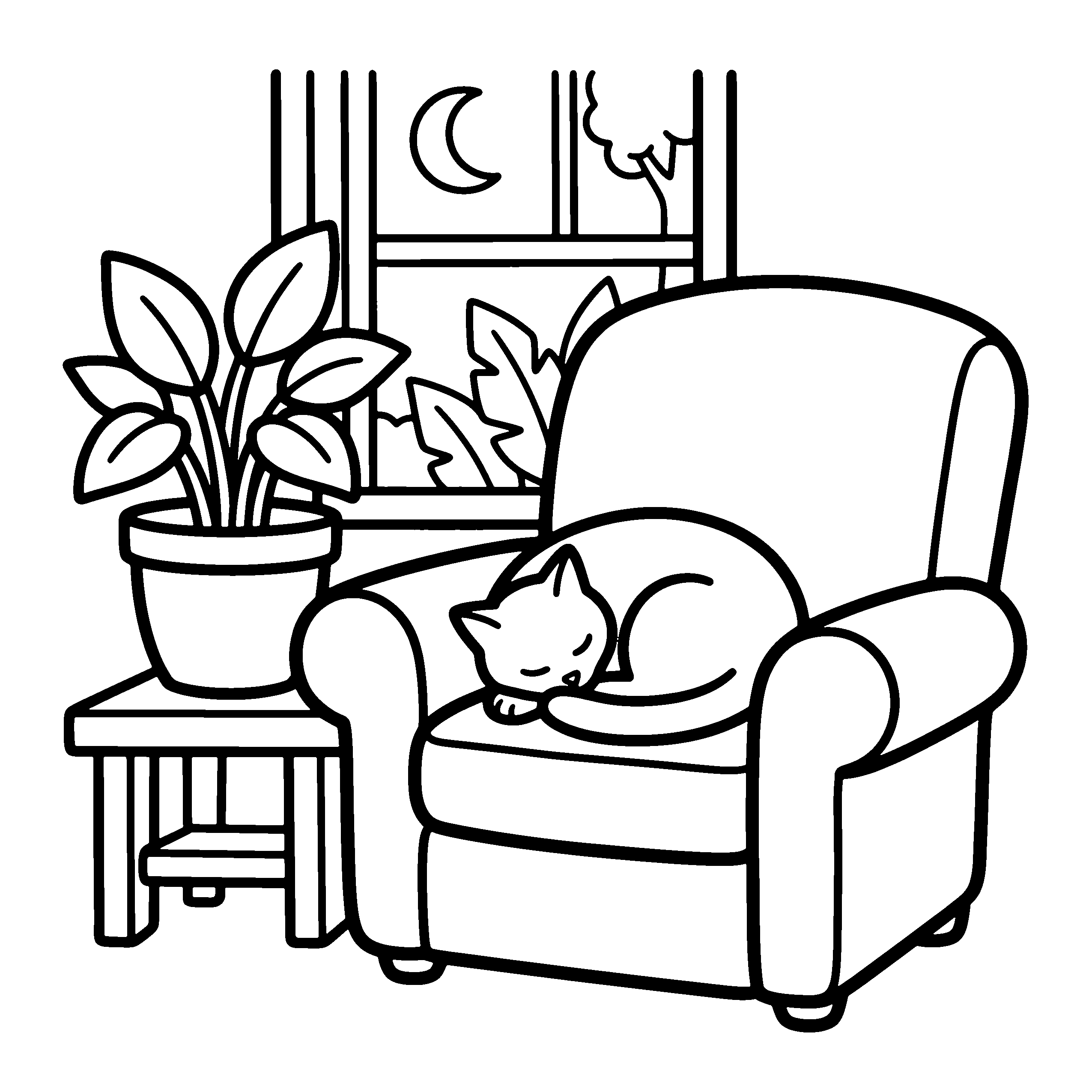
That page is a real output from our coloring page generator for KDP after this cleanup. The file is 2,550 x 2,550 px, exactly 8.5 x 8.5 inches at 300 DPI, and contains only 2 colors: pure black and pure white. Every shape is closed, nothing is shaded, and there's no frame.
How do you turn AI images into a KDP-ready interior?
Place each cleaned page at 300 DPI at your exact trim size, add a blank page behind every design, add front matter, and export one PDF. KDP asks that "all images (both cover and manuscript) should be at least 300 DPI" [1], which means 2,550 pixels across an 8.5 inch page, not the 1024 or 1536 px most image tools return.
The resolution gap is bigger than it looks. OpenAI's recommended image sizes are "1024x1024 (square), 1536x1024 (landscape), 1024x1536 (portrait)" [4]. Stretch a 1024 px wide image across 8.5 inches and you get about 120 DPI, so every line prints soft. Upscale first, then convert to black and white, so the final edges come out crisp at full resolution.
Then the layout settings:
- Bleed or no bleed. Line art surrounded by white margin doesn't need bleed, so choose No Bleed and keep the art inside the margins. If any art touches the page edge, KDP requires "0.125 in (3.2 mm)" of bleed and the PDF has to be built at the larger size [2]. The 6 bleed mistakes guide covers the setting-versus-file mismatch that causes most rejections.
- Margins. Keep art at least 0.25 inch from the top, bottom and outside edges without bleed, or 0.375 inch with bleed [2]. The inside margin grows with page count.
- Single-sided layout. One design, one blank back, repeated. Buyers who color with markers expect it, and books without blank backs collect bleed-through reviews.
- Page count. At least 24 pages [1]. Once the count is final, the KDP size calculator gives your exact spine width and full cover size.
Do you have to tell Amazon the pages were made with AI?
Yes. KDP defines AI-generated content as "text, images, or translations created by an AI-based tool," and says that includes "cover and interior images and artwork" [3]. Pages you generated with AI are AI-generated even if you cleaned them up afterwards. You answer the question on the content step of the KDP upload flow.
The line KDP draws is between generating and assisting. If you drew the pages yourself and used AI only to edit or refine them, that counts as AI-assisted and doesn't need declaring [3]. For a book whose pages came out of an image generator, it's generated. Declaring doesn't block publishing.
The KDP AI disclosure guide for coloring books goes through the edge cases: AI covers on hand-drawn interiors, traced AI references, and what the declaration does and doesn't change for your listing.
How do you check the book before you upload?
Check 3 things before you click publish: every page is pure black and white at 300 DPI, the PDF page size matches your trim and bleed setting, and the page count is final. Then open KDP's previewer and page through the whole book, because that's where margin and gutter problems show up before a reviewer flags them.
The KDP manuscript pre-flight checker runs the file-level checks in your browser. When KDP does reject a book, the email is usually vague, and the KDP rejection guide maps each message to its cause.
One check no tool does for you: flip through all 40 designs in a row. Style drift, a repeated composition, or one page with a sixth finger is obvious at speed and easy to miss one page at a time.
Which AI workflow should you use?
You can make a sellable coloring book with a general image tool, a cleanup editor and a layout app, as long as you do every step above by hand for every page. Or you can use a tool that applies those steps for you. The output standard is the same either way: pure black line art, 300 DPI at trim size, single-sided, declared as AI.
The manual route costs time per page. Prompt, regenerate, clean, upscale, threshold, place, and do it 40 times without the style drifting. That's fine for a first book and tiring by the fifth.
The AI coloring page generator is built for the second route: you set the theme, audience and trim size once, and every page comes back as 300 DPI black and white line art in one consistent style, ready to drop into a single-sided KDP interior. If you're still deciding between tools, the AI coloring book generator comparison puts the options side by side.
References
- Paperback Submission Guidelines- Amazon KDP Help
- Set Trim Size, Bleed, and Margins- Amazon KDP Help
- Content Guidelines (AI-Generated Content)- Amazon KDP Help
- Image generation- OpenAI API documentation
Ready to publish a KDP coloring book?
BookIllustrationAI generates KDP-ready coloring pages at 300 DPI in bold and easy or detailed line-art styles, formatted for any trim size. Go from niche to a complete interior PDF without design tools.
Related Posts
How to make a coloring book on Canva for Amazon KDP [2026]
Make a KDP coloring book in Canva: the page size for your trim, blank backs, and the one PDF Print checkbox that gets your file rejected. Step by step.
Coloring book cover design: 6 layouts and a legibility test
Amazon warns that white covers can disappear against its own page background. See the 6 coloring book cover layouts and the test that catches it.
How to Plan a Coloring Book: 40 Designs, 8 Previewed
Plan a coloring book by deriving 40 designs from your validated niche. Amazon previews 20% at random, so see why your weakest design sells the book.